D355 Premium Watch Face
YosashPersonalization
4.3111.00 Reviews
- Version
- 1.0.17
- Installs
- 10.00K
- Age Rating
- Everyone
Screenshots
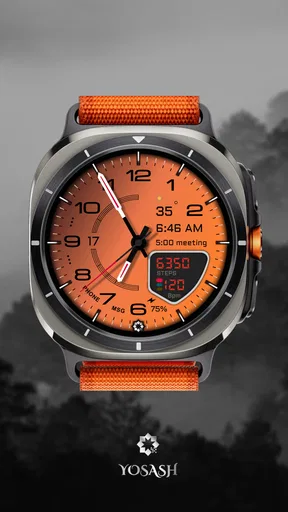
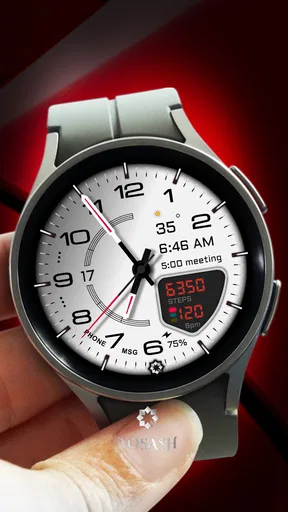
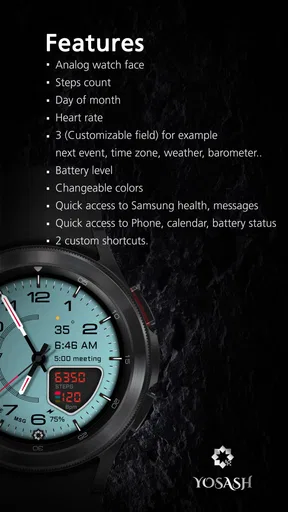
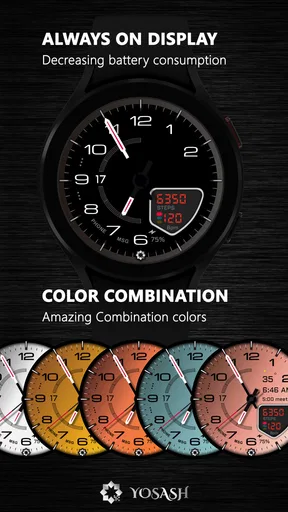
Our Review of D355 Premium Watch Face
 Analysis by Appyee
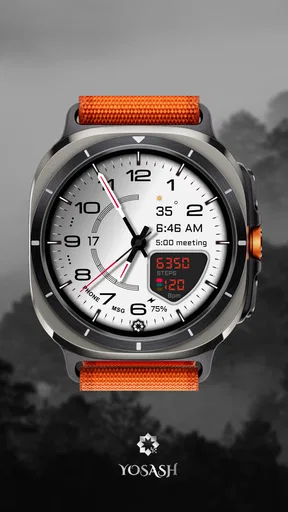
When I judge a watch-face app, I look past the polished look and ask a more practical question: what can I actually see and control, and what does the purchase ask me to trust? That matters because a watch face sits on a device people glance at throughout the day, sometimes in personal or busy moments. D355 Premium Watch Face is a personalization app by Yosash for Galaxy and Pixel watches, and its appeal is clear: it gives the watch a more dressed-up appearance. My recommendation is more cautious than the design pitch, though. I’d choose it for its visual character, while checking that its available options suit the way I use a watch.
What the purchase means in practice
The app costs $0.99, so this is a small paid customization rather than a subscription decision. I like that distinction: if all you want is a new look, a one-time purchase is easier to weigh than another recurring charge. Still, I would not buy it on the assumption that every feature shown or described will fit every device. Watch-face layouts can feel different across screen sizes and models, so I’d first think about which details I need to read quickly and whether a busier, more decorative design works for me.
Its current version is 1.0.17, and the app has an average rating of 4.3 from around 986 ratings, with over 10,000 installs. Those figures make it a product with an established audience, but they don’t tell me how it behaves on my particular watch or what data it handles. I treat ratings as a reason to investigate, not as a substitute for checking the actual setup and choices on my device. The age rating is Everyone, which describes its content classification; it isn’t a privacy assessment.
Trust depends on choices you can see
For a watch face, my trust check is very concrete. I look at the permissions Android presents during installation or setup, read each request in context, and ask whether it makes sense for the function I’m trying to use. If a permission appears, I don’t assume it is harmless or necessary just because the app is about a watch. I decide whether to allow it, deny it, or leave a related feature unused when Android offers that choice.
I also separate what I can verify on my device from what I cannot responsibly infer. A refined dial, a named developer, a paid price, or a large install count does not by itself explain data collection, storage, sharing, or account controls. I’d look for the app’s privacy information and the system’s permission controls before enabling anything involving personal information. If those details aren’t clear enough for my comfort, I would keep my setup limited rather than guessing.
Small-screen use and real routines
The practical test for me is whether the design helps during an ordinary day. Picture checking the time while carrying groceries, then glancing again before a meeting: a watch face earns its place when the information I care about is legible at a glance, not when it merely looks impressive in a product image. I’d try the face in daylight and indoors, and check whether the main time display remains easy to read with my usual wrist position. If I need to stop and study the screen, a simpler built-in face is probably better for that routine.
Before settling on a layout, I’d also decide what I want the watch to do at a glance. If activity information is useful to me, I’d check how the available display options present it and whether I can distinguish it from decorative elements. If I mostly need time and date, extra information may add clutter rather than value. That trade-off is personal: a richer face can reduce the need to open other screens, but a restrained one can be quicker to read.
Who I’d recommend it to
I’d point this app toward someone with a compatible Galaxy or Pixel watch who wants a more polished look and enjoys adjusting a watch face to match a preference. It is less compelling for someone who values a plain dial, wants to avoid paid customization, or needs every element to be exceptionally large and uncomplicated. In those cases, the watch’s built-in choices may be the more comfortable option, and there is no reason to pay for decoration that makes everyday reading harder.
Compared with the usual alternatives—free built-in faces or other downloadable designs—the decision is mostly about taste, readability, and the specific controls available after installation. Built-in faces are convenient because they require less shopping around; a dedicated design can feel more distinctive, but only if its appearance and information layout work for you. I’d compare the options on the actual watch rather than choosing from a phone preview alone. I’d also check whether the watch’s screen and interface let me make the changes I want before treating customization as a reason to buy.
My cautious verdict
Overall, I see D355 as a style-first purchase that may suit people who enjoy giving a smartwatch a more considered look. Yosash has a visible, established app listing, but I wouldn’t turn that into a claim about privacy or support; those are separate questions I’d assess through the permissions and information available on my device. The price is modest, yet the best reason to install it is still simple: you like its appearance and can read it comfortably.
First Impressions
When I first stumbled upon the D355 Premium Watch Face, I wasn’t quite sure what to expect. But let me tell you, from the moment I installed it, I was hooked. The design is sleek, modern, and just oozes sophistication. It’s like the Swiss Army knife of watch faces—functionality meets elegance.
Design and Features
One of the first things you’ll notice is the attention to detail. The graphics are crisp, and the colors are vibrant without being overpowering. You can tell a lot of thought went into the design elements. It's not just about looking good; it's about enhancing usability.
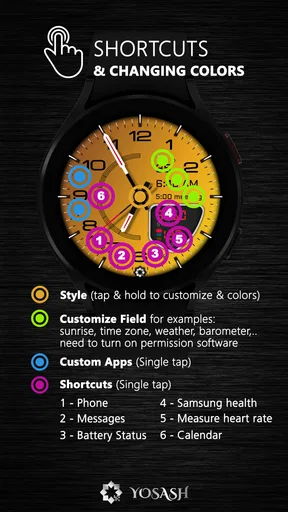
The app offers a variety of customization options. You can tweak everything from the color schemes to the widget layouts. Want to match your watch face with your outfit? No problem. Need quick access to your step count or heart rate? It's right there. The level of customization is fantastic, allowing you to personalize it to suit your needs.
User Experience
If you’re worried about the app being tough to navigate, fear not. The interface is incredibly intuitive. I didn’t find myself fumbling around trying to figure out how to change settings or adjust layouts. It’s all very user-friendly, which is a huge plus for those of us who aren’t exactly tech wizards.
Another neat feature is the battery optimization. Unlike some other watch faces that seem to drain your battery faster than you can say "low battery," the D355 is designed to be efficient. It’s like the app read my mind—because who really wants to charge their watch all the time?
Performance
Now, let’s talk performance. I’ve had experiences with other watch faces that lag or glitch, but I didn’t encounter any issues with the D355 Premium. It’s smooth, fast, and reliable. The animations are seamless, and transitions between screens are buttery smooth. It makes checking the time feel like a luxury experience.
I also appreciate the real-time updates. Whether it’s the weather or notifications, everything is displayed promptly. It’s like having a personal assistant on your wrist, keeping you in the loop without being intrusive.
Compatibility
The app is available for both Android and iOS, which is a big win. No matter what platform you’re on, you can enjoy the same high-quality experience. Plus, the installation process is a breeze—no tech degree required!
Final Thoughts
Overall, the D355 Premium Watch Face is a fantastic addition to any smartwatch. It combines style, functionality, and efficiency in a way that feels effortlessly elegant. If you’re looking to give your watch a fresh look without sacrificing performance, this app is definitely worth checking out.
So, if you’re ready to turn your smartwatch into a statement piece, head over to your app store and give the D355 a spin. Trust me, you won’t be disappointed!
Verdict
Strengths of D355 Premium Watch Face
- Highly customizable watch face options.
- Battery-friendly design for longer use.
- Real-time weather updates included.
- Compatible with many smartwatch models.
- Seamless integration with fitness apps.
Limitations of D355 Premium Watch Face
- Limited free features; premium needed.
- Occasional lag on older devices.
- Weather updates require location access.
- Some features need constant internet.
- Premium version is relatively pricey.
Similar Picks in This Category
View All
Microsoft SwiftKey AI Keyboard
SwiftKey4.3

Wallpapers
Google LLC4.1

Zedge™ Wallpapers & Ringtones
Zedge4.7

Yandex Browser with Alice AI
Direct Cursus Computer Systems Trading LLC4.3

Ringtone Maker:create ringtone
Big Bang Inc.4.7

Fonts Keyboard
Fonts Keyboard3.9
Frequently Asked Questions
What features does the D355 Premium Watch Face offer?
The D355 Premium Watch Face comes packed with a variety of features designed to enhance your smartwatch experience. It includes customizable watch faces, weather updates, fitness tracking integrations, and different styles and color schemes to suit your personal taste. Additionally, it supports both analog and digital displays, catering to a wide range of preferences.
Is the D355 Premium Watch Face compatible with all smartwatches?
The D355 Premium Watch Face is compatible with most Android and iOS smartwatches that support custom watch faces. However, it's always a good idea to check your device's specifications and ensure it supports third-party watch face installations. Compatibility might vary depending on the operating system version and the smartwatch model.
How does the D355 Premium Watch Face impact battery life?
Battery consumption is a common concern with any watch face. The D355 Premium Watch Face is optimized to minimize battery drain, but it might slightly impact your smartwatch's battery life, especially if you use features like always-on display or frequent updates. Adjusting settings can help manage battery usage effectively.
Can I customize the appearance of the D355 Premium Watch Face?
Yes, customization is one of the highlights of the D355 Premium Watch Face. Users can personalize their watch face by choosing from various themes, colors, and widget placements. This allows you to tailor the look and feel of your smartwatch to match your style and preferences, enhancing the overall user experience.
Is there a cost associated with the D355 Premium Watch Face?
The D355 Premium Watch Face may come with a one-time purchase cost or offer in-app purchases for additional features and themes. Prices can vary, so it's advisable to check the app store for current pricing. Some features might be available for free, while others require payment to unlock the full potential of the app.
